Reports
The Allowance and Absence reports, what each figure counts, and how to filter them.
Reports shows how much leave people have, have taken and have booked. Managers, admins and owners can open it from Reports in the menu. Managers see only the people they manage. Admins and owners see everyone.
The figures come from the same records as each person's balance history, so a row in the report always matches what that person sees in My leave and behind Why this number?.
- 1
Choose a report
Choose Allowance or Absence at the top of the page.
- 2
Choose the leave year or the dates
For Allowance, choose Last leave year, This leave year or Next leave year. For Absence, choose a start and end date; it starts on the current calendar year.
- 3
Filter the table
Use Search people to find someone by name, or Department to show one department. The tiles above the table add up the rows you're looking at.
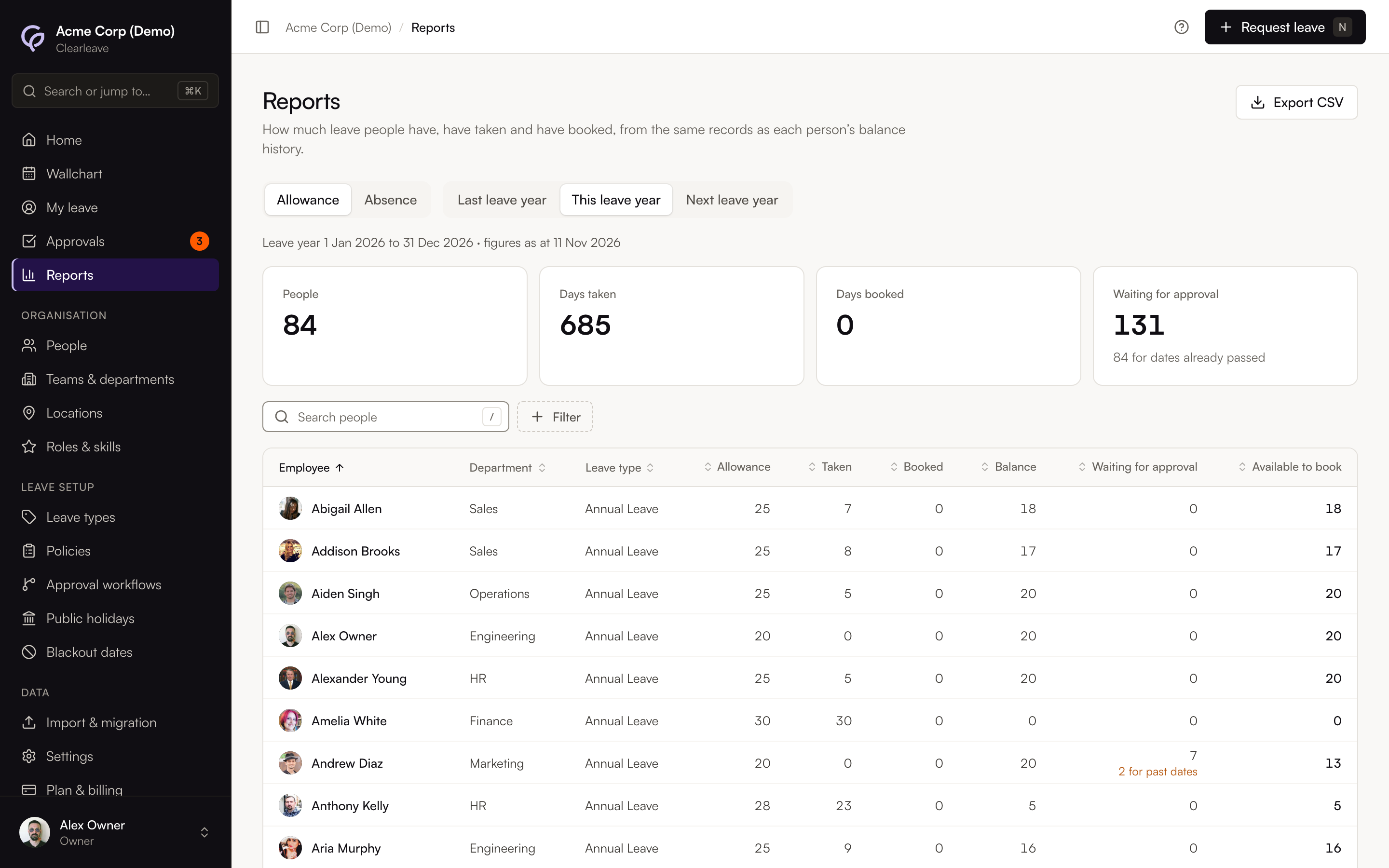
Allowance
There's one row for each person and leave type that uses up an allowance, for the leave year you chose. The line above the tiles shows the leave year's dates and the day the figures are worked out at: today, or the first day of a leave year that hasn't started yet. If people have different leave years, a Leave year column shows each person's.
| Column | What it counts |
|---|---|
| Allowance | Days granted for the leave year: the annual grant (or the monthly accruals so far), carry-over and any adjustments, including a change of start date |
| Taken | Approved leave that has started, plus leave imported from before Clearleave and public holidays taken from the allowance so far |
| Booked | Approved leave that hasn't started yet |
| Balance | Allowance minus taken and booked. The same as Balance on in the person's balance history |
| Waiting for approval | Days in this leave year in requests nobody has approved or declined yet. Requests whose dates have passed are included, with a note such as "2 for past dates" so you can decide them. They're never counted as taken or booked |
| Available to book | Balance minus waiting for approval: the "days left to book" the person sees in My leave |
Leave counts in the leave year its days fall in, whenever it was asked for or approved. Leave over the end of a leave year is split between the two years by working day.
The tiles show People, Days taken, Days booked and Waiting for approval. On a phone the leave year buttons read Last year, This year and Next year.
Sick leave and other leave types that don't use up an allowance aren't in this report. You'll find them in the Absence report.
Absence
There's one row for each person and leave type with approved leave on dates in the period. Leave is counted by the dates it's taken, not by when it was asked for or approved. If leave runs over the start or end of the period, only its days inside the period count.
| Column | What it counts |
|---|---|
| Occasions | The number of approved requests with at least one day in the period |
| Days taken | Days in the period of approved leave that has started |
| Days booked | Days in the period of approved leave that hasn't started yet |
| Total days | Days taken plus days booked |
Requests waiting for approval aren't included. The tiles show People with absence, Days taken, Days booked and Average per occasion.
Sorting and exporting
Select a column heading to sort the table. The Allowance report is sorted by name to start with. The Absence report is sorted by the most days to start with.
To download a report as a CSV file, select Export CSV. In the Absence report, Export each absence downloads one line for each absence instead, with its start and end dates. See Export a report.
If the table is empty, try another leave year or a longer date range, or clear the filters. Next year's allowances appear once the year starts, or as soon as someone books leave in it.