Check your leave balance
See how many days you have left, and read the balance history that shows how every number was worked out.
Your balance is on Home and in My leave. It shows how many days you have left to book, and how they've been worked out.
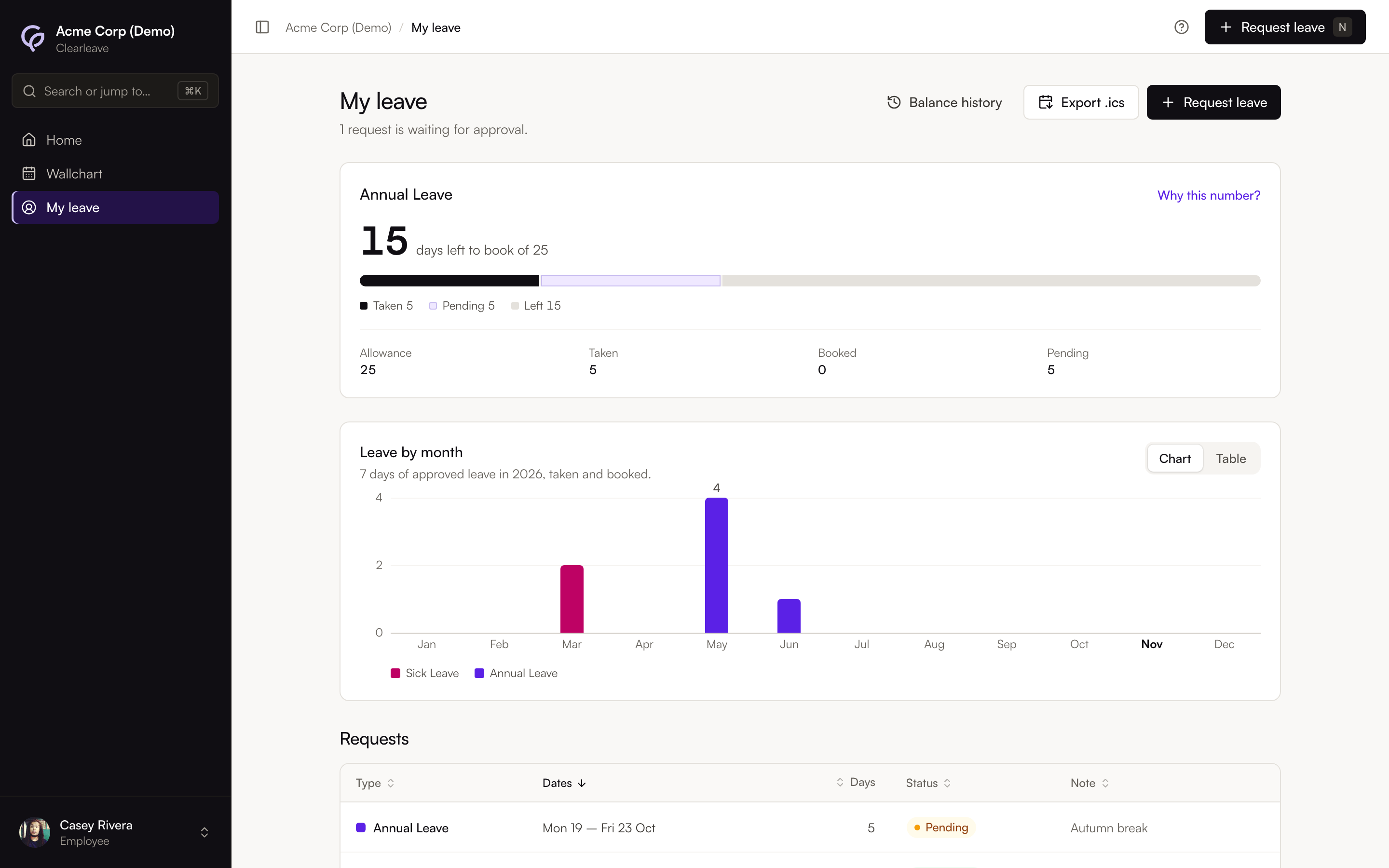
Read the summary
In My leave, the main card shows something like "10.5 days left to book of 27". Below it, a bar and four figures break this down:
| Figure | What it means |
|---|---|
| Allowance | Everything you've been given this leave year: your allowance, any days carried over, any days earned, and any adjustments. |
| Taken | Approved leave that has already started or finished. |
| Booked | Approved leave that hasn't started yet. |
| Pending | Days in this leave year in requests that are still waiting for approval. |
Days left to book are your allowance, minus taken, booked and pending days. Pending days are held back so you can't book the same days twice. If a request is declined, its days come back. Leave you book for dates in the next leave year comes out of next year's allowance, not this one.
If you have other leave types with an allowance, they're listed next to the main card with "X of Y left".
On Home, you'll also see a reminder when you have days carried over from last year, with the date they expire.
In My leave, Leave by month shows your approved leave for the calendar year, month by month, in each leave type's colour. Use Show as to switch between Chart and Table.
See the full history
Select Why this number?, or Balance history in My leave, to open the ledger for a leave type. Use Leave type to switch between types.
Each row is one change to your balance in this leave year, in date order, with its type, details, the change in days and the running balance. The types you'll see include:
- Allowance: your yearly allowance.
- Earned: days added as you earn them, if your allowance builds up through the year.
- Carried over and Carry-over expired: days brought in from last year, and any that expired unused.
- Adjustment: a change made by an admin, with their reason.
- Leave taken and Leave booked: an approved request. It shows as Leave booked until the leave starts.
- Public holiday: a holiday that comes out of your allowance, if your company counts holidays that way.
- Cancelled — restored: days given back when approved leave was cancelled.
- Imported: a balance brought in from your previous system.
Under the entries, Balance on shows your balance on today's date. Requests still waiting for approval are listed below it as Pending. The last row, Available to book, is the balance minus those requests: the same "days left to book" figure as on Home and My leave.
Entries are never edited or deleted. A correction is added as a new entry, so you can always check the total.